# Rsdoctor
> A one-stop build analyzer for Rspack and webpack.
## Guide
- [FAQ](/guide/more/faq.md)
- [Rule index](/guide/more/rules.md)
- [Custom extension rules](/guide/rules/rule-custom.md)
- [Built-in rules](/guide/rules/rules.md)
- [Data upload](/guide/rules/upload-data.md): To perform data upload, you need to use the interface of custom extension rules. Please refer to Custom Extension Rules for more information. The same approach used for custom extension rules can also be used for collecting and uploading user data. The only difference is that you don't need to report any errors in the check function. For example:
- [GitHub Action Integration](/guide/start/action.md): Integrate Rsdoctor analysis in CI/CD workflows using rsdoctor-action
- [AI](/guide/start/ai.md): To help AI better understand Rsdoctor's features, configuration, and best practices so it can provide more accurate assistance during day-to-day development and troubleshooting, Rsdoctor provides the following capabilities: Agent SkillsMCP Serverllms.txtMarkdown docsAGENTS.md
- [CI/CD tutorial](/guide/start/cicd.md): In CI/CD, there is often a desire to upload historical reports to the CDN as historical records. Because it's not convenient to achieve instant use in the standard mode, the Brief mode is supported.
- [CLI tutorial](/guide/start/cli.md): We provide @rsdoctor/cli for you to use Rsdoctor's features locally through the CLI program.
- [Features](/guide/start/features.md): Here you can learn about the main features supported by Rsdoctor.
- [Introduction](/guide/start/intro.md): Rsdoctor is a build analyzer tailored for the Rspack ecosystem and fully compatible with the webpack ecosystem. Rsdoctor is committed to being a one-stop, intelligent build analyzer that makes the build process transparent, predictable, and optimizable through visualization and smart analysis, helping development teams precisely identify bottlenecks, optimize performance, and improve engineering quality. Rsdoctor supports all tools and frameworks based on Rspack or webpack, such as: Docusaurus, Rspeedy (Lynx), Storybook, Next.js, Nuxt, Re.Pack, Modern.js, Rsbuild, Rspress and Rslib.
- [Playground](/guide/start/playground.md)
- [](/guide/start/quick-start-shared.md)
- [Quick start](/guide/start/quick-start.md): This document will explain how to access the Rsdoctor ability.
- [Bundle alerts](/guide/usage/bundle-alerts.md)
- [Bundle diff](/guide/usage/bundle-diff.md): We provide the Bundle Diff feature, which allows you to compare and analyze the changes between two build bundles. Currently, we offer the following usage methods: Open locally with CLIOnline upload analysis (planned support)
- [Bundle overall](/guide/usage/bundle-overall.md)
- [Bundle analysis](/guide/usage/bundle-size.md)
- [Compile alerts](/guide/usage/compile-alerts.md): We have integrated some capabilities based on compilation data detection. If the current compilation result contains data that hits the rules we define, the Compile Alerts module will appear at the bottom of the Rsdoctor main interface, as shown in the image below: This module allows us to visually see some warning information about our project's compilation, which can help us further optimize the project's compilation performance.
- [Compile overall](/guide/usage/compile-overall.md)
- [Loaders analysis](/guide/usage/loaders-analysis.md): Rsdoctor provides the Loader Analysis module, which mainly provides statistics on Loaders at the directory and file level. It helps you analyze the compilation of folders and individual files by Loaders. Click on the navigation bar "Compile Analysis" -> "Loader Analysis" option to view the compilation analysis report. Of course, this page will only display the features if the loader analysis capability is enabled features.
- [Loaders timeline](/guide/usage/loaders-timeline.md)
- [MCP Server](/guide/usage/mcp.md)
- [Module analysis](/guide/usage/module-analysis.md)
- [Plugin analysis](/guide/usage/plugins-analysis.md)
- [Project overall](/guide/usage/project-overall.md)
- [Resolver analysis](/guide/usage/resolver.md): In the Rsdoctor Module Resolve section, we can see all the source files in the current Rspack project. By clicking on a file, we can view information such as the module paths imported in that file, the before and after resolution path comparison, and the resolution time, as shown in the following image:
- [Compilation diagnostic rules](/guide/usage/rule-config.md): Building diagnostic rules is similar to ESLint like lint tools, but different from it in that ESLint performs code scanning and is unrelated to the build process. In contrast, the code diagnostics here are closely related to the build process of Rspack or Webpack, incorporating many internal parameters generated during the build process to aid judgment, such as ModuleGraph, Webpack's internal markings for each module, and runtime added after code transformation, among others. During the build process, if issues are discovered, they will be visible in the CLI and the final diagnostic summary webpage, as shown below: 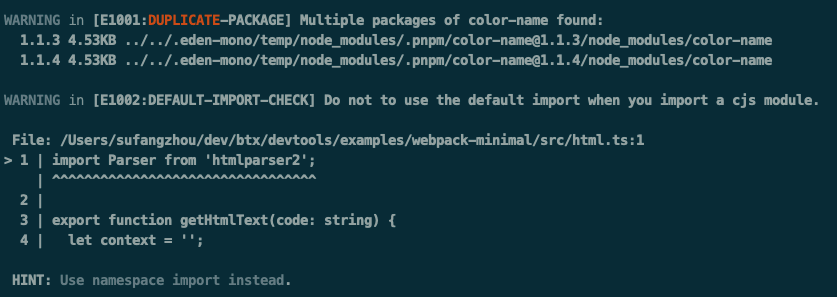
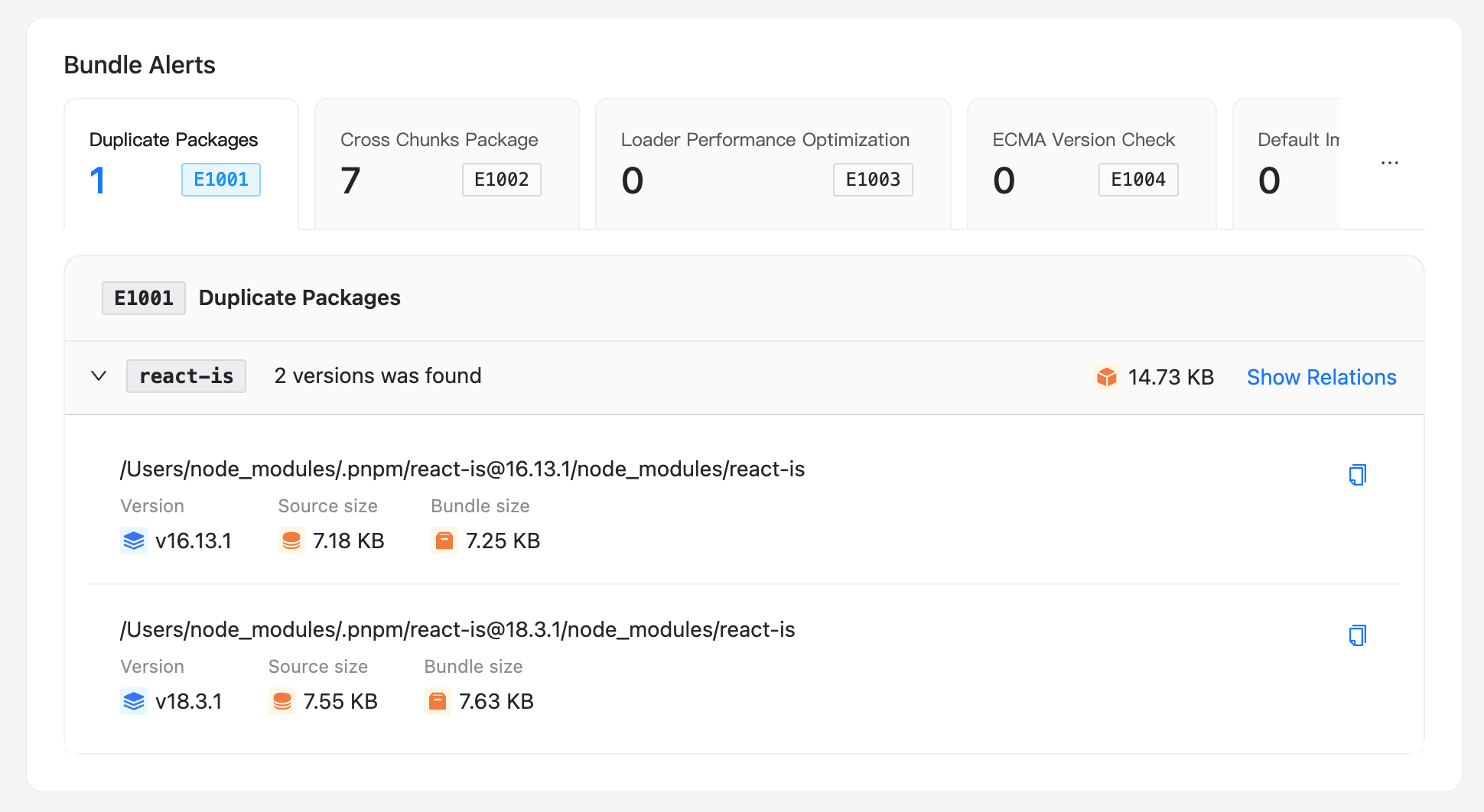 ## Config
- [brief](/config/options/brief.md): Type: BriefTypeOptional: trueDefault: undefined Detailed configuration options for Brief mode are as follows: reportHtmlName: Configures the filename of the HTML report in Brief mode. The default value is report-rsdoctor.html.writeDataJson: (Deprecated, please use output.options.type: ['json', 'html'], refer to output.options.type.) By default, Brief mode injects the analysis data directly into the HTML file, so no additional build analysis data files are generated. If you need to generate additional local JSON data files, you need to configure writeDataJson: true.
- [disableClientServer](/config/options/disableClientServer.md): Type: booleanOptional: trueDefault: false, when process.CI is true, the default value is true, meaning the report service is disabled by default in CI environments. Whether to automatically open the Rsdoctor report page. If you do not need to view the analysis report provided by Rsdoctor in the browser, you can enable this configuration item.
- [experiments](/config/options/experiments.md)
- [features](/config/options/features.md): Type: RsdoctorWebpackPluginFeatures | Array | RsdoctorRspackPluginFeatures | ArrayOptional: trueDefault: ['loader', 'plugins', 'bundle']
- [mode](/config/options/mode.md): Type: "normal" | "brief" | "lite"lite mode will be deprecated in V2, refer to lite mode deprecation noticeOptional: trueDefault: normal Select the Rsdoctor build report mode to use, which includes the following options: normal mode: Generates a .rsdoctor folder in the build output directory, which contains various data files and displays code in the report page. The output directory can be configured via reportDir.brief mode: Generates an HTML report file in the .rsdoctor folder within the build output directory. All build analysis data will be consolidated and injected into this HTML file, which can be viewed by opening it in a browser. Brief mode also has additional configuration options, detailed at: brief.lite mode: Based on the normal mode, this mode does not display source code and product code, only showing the information of the bundled code.lite mode will be deprecated in V2, refer to lite mode deprecation notice.
- [](/config/options/options-shared.md)
- [Configuration Migration Guide](/config/options/options-v2.md): Rsdoctor introduced new configuration options in version 1.2.4. These new configuration options are easier to configure, more extensible, and compatible with the upcoming v2.0 release. Configuration options from version 1.2.3 and earlier will still be supported, but will be completely deprecated in Rsdoctor v2, so we recommend migrating to the new configuration options in 1.2.4.
- [Overview](/config/options/options.md)
- [output](/config/options/output.md)
- [port](/config/options/port.md): Type: numberOptional: trueDefault: random(3000, 8999) Configure the port for the Rsdoctor server.
- [supports](/config/options/supports.md): Type: Supports TypesOptional: trueDefault: undefined This option is used to configure whether Rsdoctor enables support for certain detailed feature analysis capabilities, such as whether to enable compatibility with BannerPlugin.
- [Terminology](/config/options/term.md)
## Blog
- [Announcing Rsdoctor 0.1](/blog/release/release-note-0_1.md): We are excited to announce the release of Rsdoctor 0.1! Rsdoctor is a one-stop build analyzer for Rspack and Webpack. It allows for detailed analysis of the build process and bundles, making the build process more visual and transparent.
- [Announcing Rsdoctor 0.3](/blog/release/release-note-0_3.md): Rsdoctor 0.3 has been released! The new features of Rsdoctor 0.3 include: Custom Extension Rules: Users can customize their own rule checks through the interface.Support for Banner Plugin: Added support for the Banner Plugin, which adds template wrapping to the bundled code, allowing analysis of code changes.Support for ESM Loader Analysis: Added support for analyzing ESM Loaders in the compilation analysis in Rspack.
- [Announcing Rsdoctor 0.4](/blog/release/release-note-0_4.md): Rsdoctor 0.4 is now released! The new features of Rsdoctor 0.4 include: Brief Mode: Outputs a single HTML file, ideal for CI processes.Bundle Diff: Compare and analyze changes between two build artifacts.Vue Loader Analysis: Added support for loader analysis in Vue projects.
- [Announcing Rsdoctor 1.0](/blog/release/release-note-1_0.md): We are excited to announce the official release of Rsdoctor 1.0! After a year of development and testing, we are proud to introduce Rsdoctor 1.0 — a build analyzer tailored for the Rspack ecosystem and fully compatible with the webpack ecosystem. Rsdoctor is committed to being a one-stop, intelligent build analyzer that makes the build process transparent, predictable, and optimizable through visualization and smart analysis, helping development teams precisely identify bottlenecks, optimize performance, and improve engineering quality.
- [Announcing Rsdoctor 1.2](/blog/release/release-note-1_2.md): Rsdoctor 1.2 has been released! 🎉 Deep concatenated module analysis: Added the ability to analyze the size of concatenated modules, helping developers more accurately identify the actual build size after Tree Shaking.Bundle Size Analysis with Gzip Support: Bundle size analysis now displays the size after gzip compression, making it easier for developers to understand the real size of production assets.Enhanced Treemap Visualization: Introduced and improved the Treemap (rectangle tree map) feature, allowing developers to gain more intuitive insights into bundle composition and resource distribution.Rsdoctor MCP: Rsdoctor MCP is an LLM-powered build analysis tool that helps developers quickly obtain build analysis results through Q&A interactions.
- [Duplicate dependency problem](/blog/topic/duplicate-pkg-problem.md): Rsdoctor will report cases where multiple duplicate dependencies exist in the same bundler's artifact.
- [Loader analysis and optimization](/blog/topic/loader-optimization.md): Optimizing loaders is a common way to improve the performance of Rspack or webpack compilation. In most cases, besides replacing the loader with a faster one, we can also reduce execution by setting module.rule.exclude for the loader. Rsdoctor provides two core modules, Loader Overall and Loader Analysis, to help you optimize based on the loader's invocation information.
## Config
- [brief](/config/options/brief.md): Type: BriefTypeOptional: trueDefault: undefined Detailed configuration options for Brief mode are as follows: reportHtmlName: Configures the filename of the HTML report in Brief mode. The default value is report-rsdoctor.html.writeDataJson: (Deprecated, please use output.options.type: ['json', 'html'], refer to output.options.type.) By default, Brief mode injects the analysis data directly into the HTML file, so no additional build analysis data files are generated. If you need to generate additional local JSON data files, you need to configure writeDataJson: true.
- [disableClientServer](/config/options/disableClientServer.md): Type: booleanOptional: trueDefault: false, when process.CI is true, the default value is true, meaning the report service is disabled by default in CI environments. Whether to automatically open the Rsdoctor report page. If you do not need to view the analysis report provided by Rsdoctor in the browser, you can enable this configuration item.
- [experiments](/config/options/experiments.md)
- [features](/config/options/features.md): Type: RsdoctorWebpackPluginFeatures | Array | RsdoctorRspackPluginFeatures | ArrayOptional: trueDefault: ['loader', 'plugins', 'bundle']
- [mode](/config/options/mode.md): Type: "normal" | "brief" | "lite"lite mode will be deprecated in V2, refer to lite mode deprecation noticeOptional: trueDefault: normal Select the Rsdoctor build report mode to use, which includes the following options: normal mode: Generates a .rsdoctor folder in the build output directory, which contains various data files and displays code in the report page. The output directory can be configured via reportDir.brief mode: Generates an HTML report file in the .rsdoctor folder within the build output directory. All build analysis data will be consolidated and injected into this HTML file, which can be viewed by opening it in a browser. Brief mode also has additional configuration options, detailed at: brief.lite mode: Based on the normal mode, this mode does not display source code and product code, only showing the information of the bundled code.lite mode will be deprecated in V2, refer to lite mode deprecation notice.
- [](/config/options/options-shared.md)
- [Configuration Migration Guide](/config/options/options-v2.md): Rsdoctor introduced new configuration options in version 1.2.4. These new configuration options are easier to configure, more extensible, and compatible with the upcoming v2.0 release. Configuration options from version 1.2.3 and earlier will still be supported, but will be completely deprecated in Rsdoctor v2, so we recommend migrating to the new configuration options in 1.2.4.
- [Overview](/config/options/options.md)
- [output](/config/options/output.md)
- [port](/config/options/port.md): Type: numberOptional: trueDefault: random(3000, 8999) Configure the port for the Rsdoctor server.
- [supports](/config/options/supports.md): Type: Supports TypesOptional: trueDefault: undefined This option is used to configure whether Rsdoctor enables support for certain detailed feature analysis capabilities, such as whether to enable compatibility with BannerPlugin.
- [Terminology](/config/options/term.md)
## Blog
- [Announcing Rsdoctor 0.1](/blog/release/release-note-0_1.md): We are excited to announce the release of Rsdoctor 0.1! Rsdoctor is a one-stop build analyzer for Rspack and Webpack. It allows for detailed analysis of the build process and bundles, making the build process more visual and transparent.
- [Announcing Rsdoctor 0.3](/blog/release/release-note-0_3.md): Rsdoctor 0.3 has been released! The new features of Rsdoctor 0.3 include: Custom Extension Rules: Users can customize their own rule checks through the interface.Support for Banner Plugin: Added support for the Banner Plugin, which adds template wrapping to the bundled code, allowing analysis of code changes.Support for ESM Loader Analysis: Added support for analyzing ESM Loaders in the compilation analysis in Rspack.
- [Announcing Rsdoctor 0.4](/blog/release/release-note-0_4.md): Rsdoctor 0.4 is now released! The new features of Rsdoctor 0.4 include: Brief Mode: Outputs a single HTML file, ideal for CI processes.Bundle Diff: Compare and analyze changes between two build artifacts.Vue Loader Analysis: Added support for loader analysis in Vue projects.
- [Announcing Rsdoctor 1.0](/blog/release/release-note-1_0.md): We are excited to announce the official release of Rsdoctor 1.0! After a year of development and testing, we are proud to introduce Rsdoctor 1.0 — a build analyzer tailored for the Rspack ecosystem and fully compatible with the webpack ecosystem. Rsdoctor is committed to being a one-stop, intelligent build analyzer that makes the build process transparent, predictable, and optimizable through visualization and smart analysis, helping development teams precisely identify bottlenecks, optimize performance, and improve engineering quality.
- [Announcing Rsdoctor 1.2](/blog/release/release-note-1_2.md): Rsdoctor 1.2 has been released! 🎉 Deep concatenated module analysis: Added the ability to analyze the size of concatenated modules, helping developers more accurately identify the actual build size after Tree Shaking.Bundle Size Analysis with Gzip Support: Bundle size analysis now displays the size after gzip compression, making it easier for developers to understand the real size of production assets.Enhanced Treemap Visualization: Introduced and improved the Treemap (rectangle tree map) feature, allowing developers to gain more intuitive insights into bundle composition and resource distribution.Rsdoctor MCP: Rsdoctor MCP is an LLM-powered build analysis tool that helps developers quickly obtain build analysis results through Q&A interactions.
- [Duplicate dependency problem](/blog/topic/duplicate-pkg-problem.md): Rsdoctor will report cases where multiple duplicate dependencies exist in the same bundler's artifact.
- [Loader analysis and optimization](/blog/topic/loader-optimization.md): Optimizing loaders is a common way to improve the performance of Rspack or webpack compilation. In most cases, besides replacing the loader with a faster one, we can also reduce execution by setting module.rule.exclude for the loader. Rsdoctor provides two core modules, Loader Overall and Loader Analysis, to help you optimize based on the loader's invocation information.