
close

内置规则

功能介绍

Tip

linter 的类型定义请参见本文档的Linter 类型定义

[E1001] Duplicate packages

规则详情

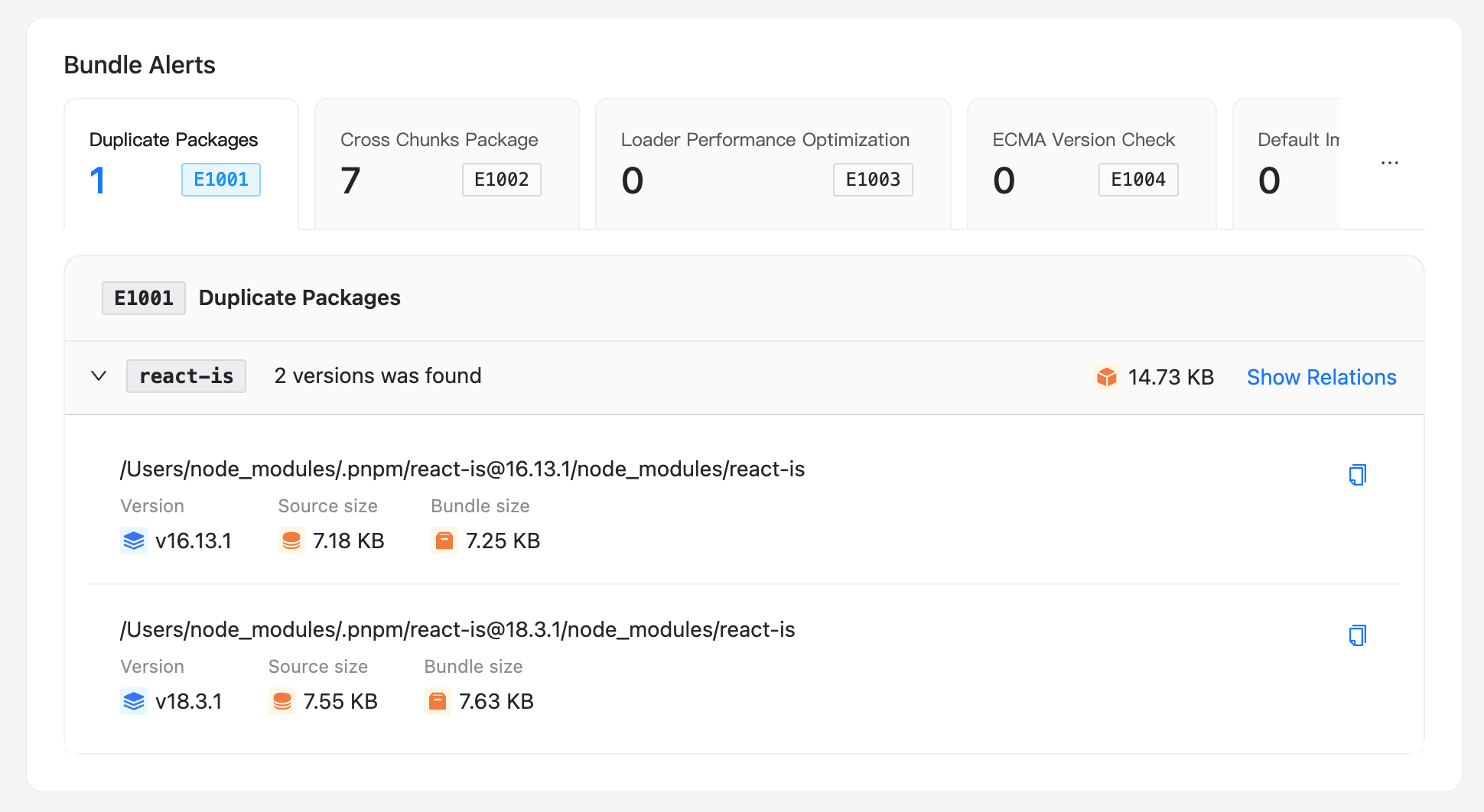
  • Duplicate Packages 卡片上展示了项目重复第三方包数目。点击图片可以查看重复第三方包的具体详情。注:这里的第三方都是被打包的第三方包。
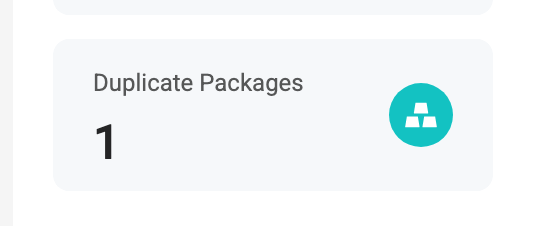
  • 重复包预警卡片

  • 点击图标展开重复包详情,可以看到:重复包的包名、版本、大小、引用文件。

    • 点击最右侧 「Show Relations」 可以查看具体这个第三方的引用链路和对应的引用文件代码位置。
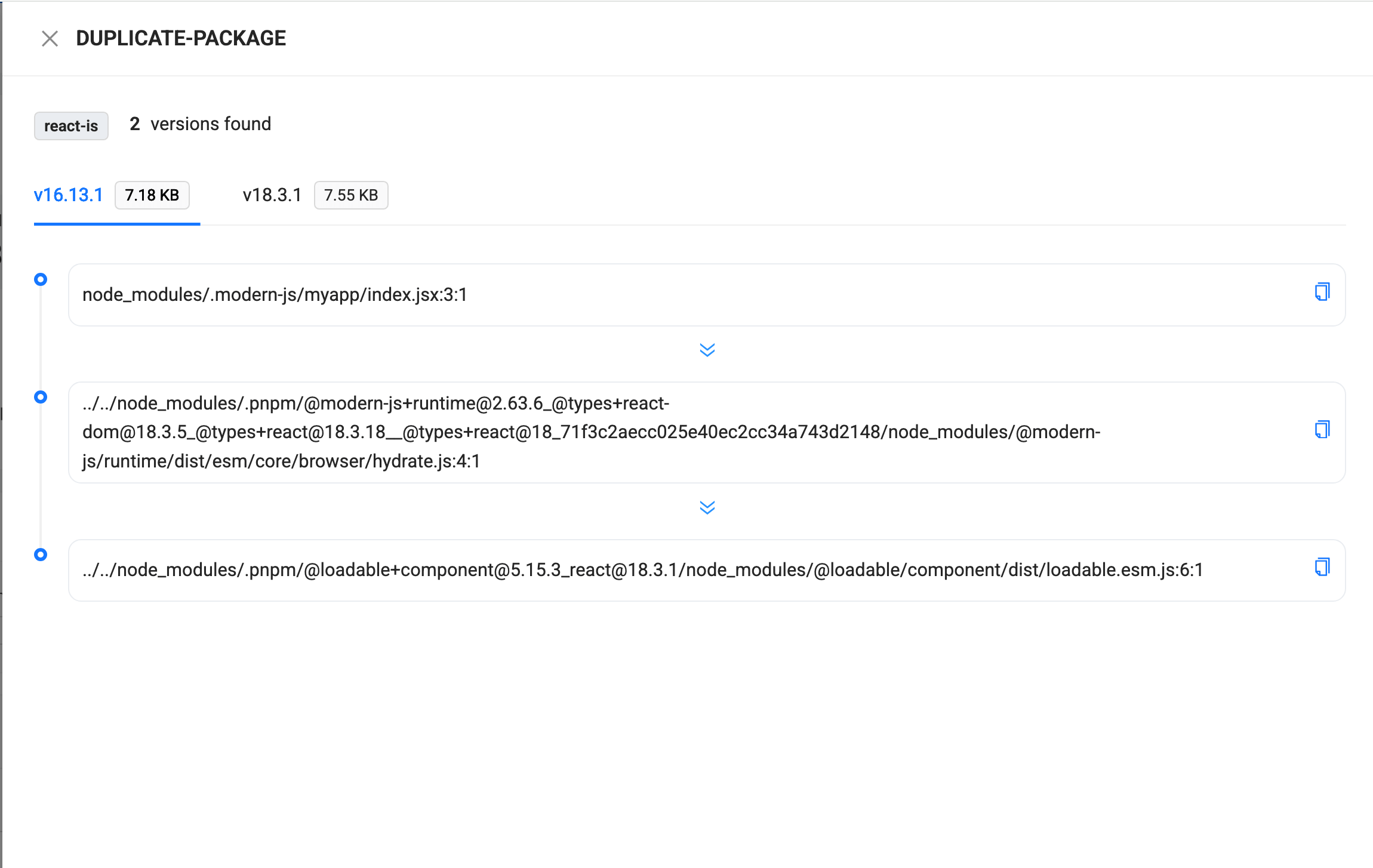
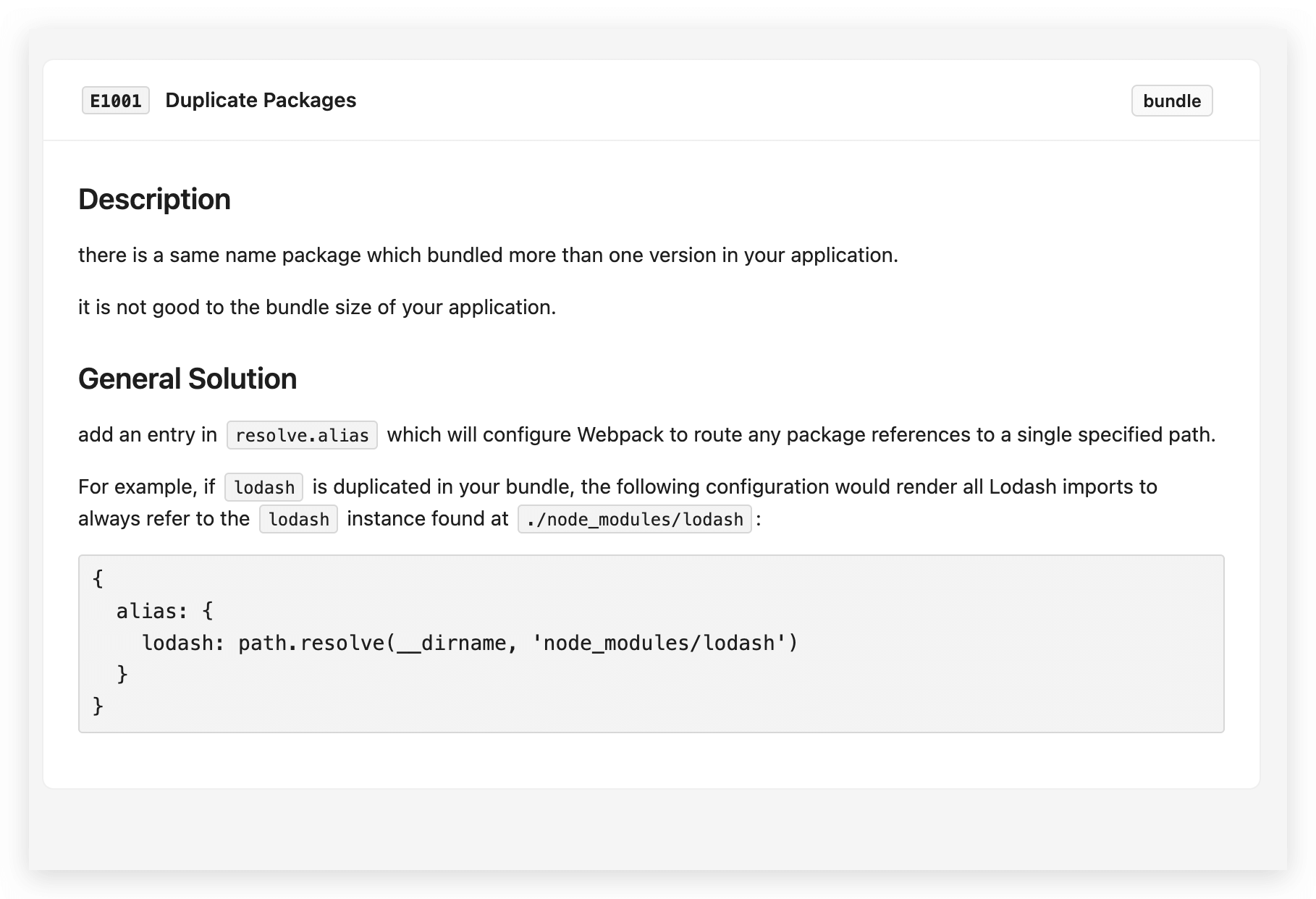
    • 点击最右侧 「!(叹号)」 图标,可以查看重复第三方包的规则的具体解释。

配置

  • 配置示例:
import { RsdoctorRspackPlugin } from '@rsdoctor/rspack-plugin';

export default {
  plugin: [
    new RsdoctorRspackPlugin({
      linter: {
        level: 'Error',
        extends: [],
        rules: {
          'duplicate-package': [
            'Error',
            {
              checkVersion: 'minor',
              ignore: ['chalk', '@babel/runtime'],
            },
          ],
        },
      },
    }),
  ],
};
类型
  • ignore: 配置需要忽略的 Packages。
  • checkVersion: 是指要检查的最大版本级别,例如:如果设置了 minor,那么重复包将不再检查 major 级别的差异。默认为 major
interface Config {
  checkVersion: keyof typeof CheckVersion;
  ignore: string[];
}

enum CheckVersion {
  null = 0,
  prerelease = 0x1,
  prepatch = 0x10,
  patch = 0x100,
  preminor = 0x1000,
  minor = 0x10000,
  premajor = 0x100000,
  major = 0x1000000,
}

重复包优化问题

请查看重复包优化方案

点击 「More」可以查看对应规则解释。

[E1002] Cross chunks package

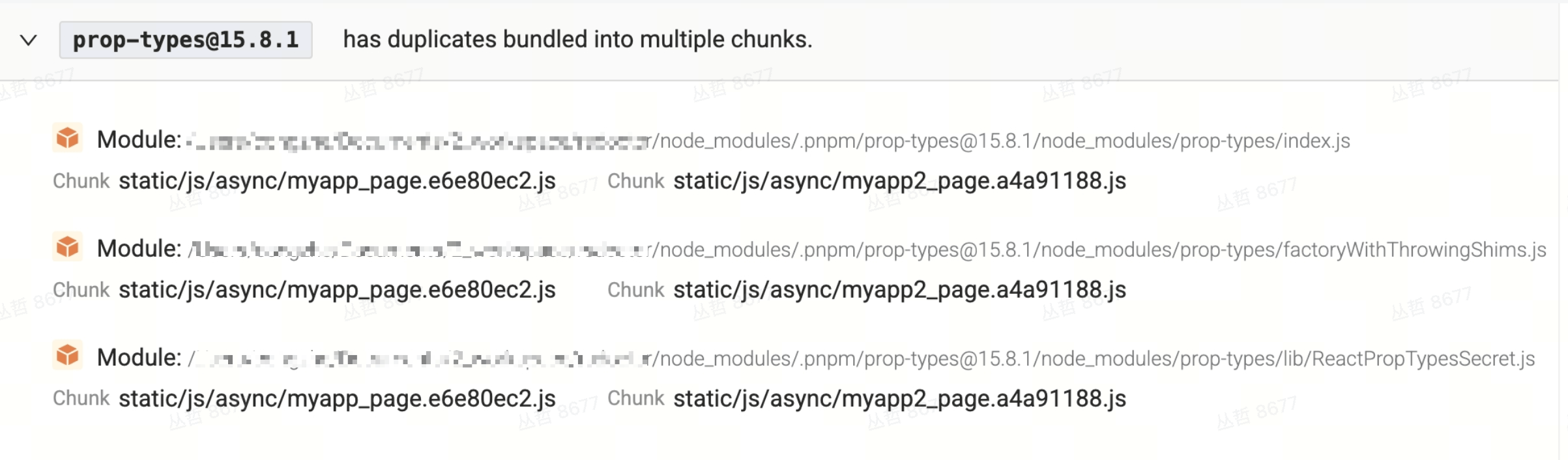
跨 Chunks 的重复包规则能够扫描不同 chunks 中的重复包。这些重复包也有可能导致打包代码冗余,具体还要看业务逻辑及冗余代码大小。

  • 展示
    • Module 是指被重复打在多个 chunk 中的 Module。
    • Chunks 则是被重复打包的产物。

解决方案

可查看 [E1002] Cross Chunks Packages

[E1003] Loader performance optimization

通过该模块可以比较直观的看到我们项目在编译方面的一些预警信息,有助于我们可以更进一步优化项目的编译性能。

解决方案

可查看 [E1003] Loader Performance Optimization

配置类型

  • ignore:可以包含字符串或正则表达式,用于指定需要被忽略的 loader 。
  • threshold: 表示 Loader 的总耗时阈值,单位为毫秒(millisecond)。如果 Loader 的执行时间超过这个阈值,则可能会触发警告或错误。默认值为5000毫秒。
  • extensions:字符串或正则表达式,用于指定在规则检查中需要匹配的文件扩展名。默认情况下,它包括常见的文件类型,如 js、css、jpg、jpeg、png、gif、webp 和 svg。
interface Config {
  /**
   * loaders which should be ignore.
   */
  ignore: (string | RegExp)[];
  /**
   * threshold which the loader total costs.
   * @unit millisecond
   * @default 5000
   */
  threshold: number;
  /**
   * the file extensions which will be match in rule check.
   * @default ["js", "css", "jpg", "jpeg", "png", "gif", "webp", "svg"]
   */
  extensions: (string | RegExp)[];
}

[E1004] ECMA version check

该规则用于检测不兼容的高级语法。在规则扫描时,优先使用 browserslist 的配置;如果未配置 browserslist,则需要手动进行检测,示例如下:

import { RsdoctorRspackPlugin } from '@rsdoctor/rspack-plugin';

export default {
  plugin: [
    new RsdoctorRspackPlugin({
      linter: {
        rules: {
          'ecma-version-check': [
            'Warn',
            {
              ecmaVersion: 2015,
              // targets: ["chrome >= 53"],
            },
          ],
        },
      },
    }),
  ],
};

类型定义

type CheckSyntaxOptions = {
  /**
   * The target browser range of the project.
   * Its value is a standard browserslist array.
   */
  targets?: string[];
  /**
   * Used to exclude a portion of source files during detection.
   * You can pass in one or more regular expressions to match the paths of source files.
   */
  exclude?: CheckSyntaxExclude;
  /**
   * Used to exclude files by output path before detection.
   * You can pass in one or more regular expressions to match the paths of source files.
   */
  excludeOutput?: CheckSyntaxExclude;
  /**
   * The minimum ECMAScript syntax version that can be used in the build artifact.
   * The priority of `ecmaVersion` is higher than `targets`.
   */
  ecmaVersion?: EcmaVersion;
  /**
   * Used to ignore specified syntax error messages after detection.
   * You can pass in one or more error message types to ignore.
   */
  excludeErrorLogs?: SyntaxErrorKey[];
};

更多 ECMA Version Check 配置请参考 ECMA Version Check Options

[E1005] Default import check

通常,Rspack 会自动兼容不同类型的模块,但在某些情况下,兼容性操作可能会失败。例如,当使用 Default Import 导入一个 cjs 模块时,如果该模块没有兼容的语句(如 exports.default),则会出现问题。

解决方案

可查看 [E1005] Default Import Check

配置

  • ignore:配置忽略一些引入的文件。
interface Config {
  /** Packages that need to be ignored */
  ignore: string[];
}

[E1006] Module Mixed Chunks

当某个模块同时被包含在 initial chunks(初始 chunk)和 async chunks(异步 chunk)中时,会导致同一份模块代码被重复打进多个 chunk,增加产物体积,并可能影响首屏加载与缓存效率。

  • Initial chunks:随主入口一起加载的 chunk(如 entry、主包里的同步 import)。
  • Async chunks:通过动态 import() 等方式按需加载的 chunk。

规则详情

  • 在 Bundle Alerts 的 「Module Mixed Chunks」 标签页中,会列出所有同时出现在初始 chunk 与异步 chunk 中的模块。
  • 每个条目会展示:模块路径、所属的 Initial Chunks 列表和 Async Chunks 列表,便于定位重复打包的模块。

常见原因

  • 同一模块被两种方式引用:既在主包或 entry 里被同步 import,又在某处被动态 import() 引用,构建工具会分别打进 initial 与 async chunk。
  • 某文件既作 entry 又作异步 chunk:例如某工具模块既在配置里被设为 entry,又在业务代码里被 import(),会导致该模块同时出现在 entry 产物的 initial chunk 和动态加载的 async chunk 中。
  • splitChunks 与 entry 重叠:通过 splitChunks / chunkSplit 把某路径单独拆成 async chunk,但该路径同时又是 entry 或主包依赖,也会出现混合。

解决方案与建议

  1. 统一引用方式
    尽量对同一模块只使用一种引用方式:要么全部同步 import(放进 initial),要么全部动态 import()(放进 async)。避免「主包同步引用 + 某处动态引用」同一文件。

  2. 审视 entry 与动态加载
    若某文件既作为 entry 又被打进异步 chunk,考虑:去掉其中一种用法;或将该文件只作为公共依赖,通过构建配置抽成单一 shared chunk,由 initial 与 async 共同引用,而不是重复打包。

  3. 调整 splitChunks / chunkSplit
    检查 optimization.splitChunks(Rspack/Webpack)或 performance.chunkSplit(Rsbuild)中对该模块路径的规则,避免同一模块被同时拆到 initial 与 async 两类 chunk。可适当使用 chunks: 'async'chunks: 'initial' 做区分,或通过 cacheGroupstestchunks 控制其只进入一类 chunk。

  4. 梳理依赖关系
    根据报告中的模块路径与 chunk 列表,在源码中搜索该模块的引用位置,区分同步与动态引用,再按上述方式收敛为单一 chunk 类型或抽成公共 chunk。

配置

  • ignore:配置需要忽略的模块路径(支持字符串匹配:模块路径包含配置中的某字符串即忽略)。
interface Config {
  /** 需要忽略的模块路径片段 */
  ignore: string[];
}

配置示例:

import { RsdoctorRspackPlugin } from '@rsdoctor/rspack-plugin';

export default {
  plugin: [
    new RsdoctorRspackPlugin({
      linter: {
        rules: {
          'module-mixed-chunks': ['Warn', { ignore: ['node_modules/'] }],
        },
      },
    }),
  ],
};

[E1007] Tree Shaking Side Effects Only

规则 key: tree-shaking-side-effects-only

当某个模块仅以副作用(side effects)方式被引入并打进产物时,该规则会发出警告。这通常是由于意外的 tree-shaking 失败导致的(例如 package.json 中缺少或错误设置了 "sideEffects" 字段,或使用了不可 tree-shake 的 import 写法),使整个模块被打包进产物,即使其导出的内容没有被实际使用。

常见原因

  • 包的 package.json 缺少 "sideEffects": false(或错误地设置为 true),导致打包器无法裁剪未使用的导出。
  • import 'some-module'import './styles.css' 这类语句被当作纯副作用引入处理,而实际意图是使用该模块的导出内容。
  • Barrel 文件(将许多内容重新导出的 index 文件)在只存在副作用引入时,导致整个模块被保留。

解决方案

  1. 审查 import 语句:确认你确实在引入并使用该模块的具名导出。当你需要使用模块的导出时,将裸副作用引入替换为显式的具名引入。
  2. 正确设置 "sideEffects":如果该模块没有全局副作用,在其 package.json 中设置 "sideEffects": false,使打包器可以安全地 tree-shake 未使用的导出。
  3. 避免非预期的副作用引入:将 import 'module' 模式转换为 import { foo } from 'module' 的显式写法(当需要使用导出时)。

配置

  • ignore:需要忽略的模块路径匹配规则(字符串匹配:模块路径包含配置中的某字符串即忽略)。
  • include:当模块位于 node_modules 下时,需要纳入检查的模块路径匹配规则(默认情况下 node_modules 中的模块会被跳过)。
interface Config {
  /** 需要忽略的模块路径片段 */
  ignore: string[];
  /**
   * 当模块位于 node_modules 下时,需要纳入检查的模块路径匹配规则。
   * 示例:['react', '@babel/runtime']
   */
  include: string[];
}

配置示例:

import { RsdoctorRspackPlugin } from '@rsdoctor/rspack-plugin';

export default {
  plugins: [
    new RsdoctorRspackPlugin({
      linter: {
        rules: {
          'tree-shaking-side-effects-only': [
            'Warn',
            {
              ignore: ['src/polyfills'],
              include: ['some-lib'],
            },
          ],
        },
      },
    }),
  ],
};

[E1008] CJS Require Cannot Tree-Shake

规则 key: cjs-require

当代码中使用裸 require() 调用(例如 const mod = require('module'))导入整个模块,而没有对导出属性做静态访问时,该规则会发出警告。这类写法会阻止打包器进行 tree-shaking,因为打包器无法静态分析实际使用了哪些导出,导致整个模块被打进产物,产物体积增大。

常见原因

  • 使用 const mod = require('module') 导入整个模块,而非 const { foo } = require('module')
  • 动态拼接 require 参数(如 require('module/' + name)),打包器无法静态分析。
  • 在 ESM 文件中混用 require(),使打包器无法对该模块做 tree-shaking。

解决方案

  1. 改用解构 require:将 const mod = require('module') 改为 const { foo, bar } = require('module'),使打包器可以静态分析实际使用的导出。
  2. 迁移到 ESM:优先使用 import { foo } from 'module' 的静态 ESM 写法,充分利用打包器的 tree-shaking 能力。
  3. 避免动态 require:如有动态加载需求,可改用动态 import() 代替动态 require()

配置

  • ignore:需要忽略的模块路径匹配规则(对 issuer 和被 require 的模块路径均做字符串匹配)。
interface Config {
  /** 需要忽略的模块路径片段 */
  ignore: string[];
}

配置示例:

import { RsdoctorRspackPlugin } from '@rsdoctor/rspack-plugin';

export default {
  plugins: [
    new RsdoctorRspackPlugin({
      linter: {
        rules: {
          'cjs-require': [
            'Warn',
            { ignore: ['legacy-lib', 'node_modules/@internal/'] },
          ],
        },
      },
    }),
  ],
};

[E1009] ESM Import Resolved to CJS

规则 key: esm-resolved-to-cjs

当某个包同时提供了 ESM 和 CJS 两种格式(通过 package.json 中的 module 字段或 exports["."]["import"]),但打包器在处理 ESM import 语句时却解析到了 CJS 入口,该规则会发出警告。这种情况会导致 tree-shaking 失效,产物体积变大。

常见原因

  • package.json 中的 exports 字段配置不正确,导致 import 条件未能正确映射到 ESM 入口。
  • 打包器版本较旧,不支持 exports 条件导出,退而解析到 CJS 入口。
  • 包本身的 module 字段或 exports["import"] 路径指向错误,或文件不存在。
  • 消费方的构建配置未开启 mainFields: ['module', ...] 或未正确处理 exports 条件。

解决方案

  1. 检查 package.jsonexports 配置:确保目标包的 exports 字段正确配置了 "import" 条件,并指向合法的 ESM 入口文件。
  2. 升级打包器或相关插件:确保使用支持 exports 条件导出的打包器版本(如 Rspack、Webpack 5+)。
  3. 联系包作者:若问题出在第三方包的 package.json 配置错误,可向包作者反馈或提 issue。
  4. 临时忽略:若该包暂无法修复,可通过 ignore 配置项跳过对该包的检查。

配置

  • ignore:需要忽略的包名匹配规则(对 import 请求字符串做子串匹配)。
interface Config {
  /**
   * 需要忽略的包名匹配规则(子串匹配 import 请求字符串)。
   * 示例:['my-legacy-pkg', '@internal/']
   * @default []
   */
  ignore: string[];
}

配置示例:

import { RsdoctorRspackPlugin } from '@rsdoctor/rspack-plugin';

export default {
  plugins: [
    new RsdoctorRspackPlugin({
      linter: {
        rules: {
          'esm-resolved-to-cjs': [
            'Warn',
            { ignore: ['my-legacy-pkg', '@internal/'] },
          ],
        },
      },
    }),
  ],
};

Linter 类型定义

  • linter字段的类型如下:
/** 校验器选项 */
interface Options {
  rules?: RulesMap;
  level?: SeverityString;
  extends?: ExtendRuleData[];
}

/**
 * 校验等级
 *   - `'Warn'`时只运行类别为`'Warn'`的规则
 *   - `'Error'`时运行全部规则
 */
type SeverityString = 'Warn' | 'Error';

/** 规则等级 */
type SeverityInput = SeverityString | 'off' | 'on';

/** 规则配置 */
type RulesMap = Record<string, RuleConfigItem>;

/** 单规则配置 */
type RuleConfigItem =
  // 仅有报错等级,此等级优先级高于规则自身配置
  | SeverityInput
  // 数组情况下,第一项为报错等级,后一项是规则配置
  | [SeverityInput, unknown];

如果要关闭某个规则,则可以 SeverityInput 设为 off,如下示例:

import { RsdoctorRspackPlugin } from '@rsdoctor/rspack-plugin';

export default {
  plugin: [
    new RsdoctorRspackPlugin({
      linter: {
        level: 'Error',
        extends: [],
        rules: {
          'duplicate-package': 'off',
        },
      },
    }),
  ],
};