

GitHub Action 集成
Rsdoctor 提供了官方的 GitHub rsdoctor-action 在 CI/CD 流程中轻松集成 Rsdoctor 分析功能。通过 GitHub Action,你可以在 GitHub 上每次构建时自动对产物进行差异分析,监控并防止产物劣化,持续优化项目性能。

快速开始
第一步:项目中安装 Rsdoctor 插件
1. 项目中参考 快速开始 安装 Rsdoctor 插件,同时按照项目类型进行配置。
2. 需要使用 Brief 模式,同时在 type 数组中添加 'json',用于后续 GitHub Action 中上传分析数据。 具体配置可查看 output 配置。
- 示例如下,Rsbuild 集成示例:
第二步: GitHub workflow 中配置
在你的 GitHub 仓库中创建 .github/workflows/ci.yml 文件,如下示例。需要注意以下几点:
file_path:必需,Rsdoctor JSON 数据文件路径。target_branch:非必需,目标分支名称,默认是 'main'。如果想用不固定的目标分支,即自动获取当前 pull request 的 target branch,而不是固定的主分支,则可以使用下方配置:
-
dispatch_target_branch:非必需,用于手动触发 (workflow_dispatch) 时指定目标分支。 -
AI_TOKEN:非必需,用于开启 AI 辅助的产物劣化分析。请将其配置为 GitHub Actions Secret,并通过 action step 的env传入。 -
ai_model:非必需,用于指定产物劣化分析使用的 AI 模型。默认值为claude-3-5-haiku-latest。Action 会根据模型名称前缀自动识别 provider。支持的前缀包括claude、gemini、deepseek和qwen;其他模型名称会使用 OpenAI provider。 -
on是指 workflow 运行的时机,通常设置为pull_request和push,也支持workflow_dispatch手动触发。- 在
pull_request时,Rsdoctor Action 会拉取 baseline 和 current,进行 bundle diff 分析。 - 在
push(即 PR 合并)时,会进行 baseline 的更新和上传操作。 workflow_dispatch允许在 GitHub Actions 页面手动触发工作流。此模式结合了push和pull_request的行为:会上传 baseline 数据,同时如果指定了dispatch_target_branch,还会进行 baseline 对比分析。
- 在
-
在执行 rsdoctor-action 之前,需要先将项目进行构建,构建时需要开启 Rsdoctor 插件,并生成 Rsdoctor JSON 数据文件。
AI 辅助分析
Rsdoctor Action 可以借助 AI 在 Pull Request 评论和 workflow summary 中总结产物劣化原因。AI 辅助分析只会在存在 baseline 数据且产物体积发生变化时运行。启用方式如下:
- 打开 GitHub 仓库,进入
Settings->Secrets and variables->Actions。 - 创建名为
AI_TOKEN的 repository secret。 - 通过
env.AI_TOKEN将 Secret 传入rsdoctor-action。 - 如果不想使用默认的
claude-3-5-haiku-latest,可以通过ai_model指定其他模型。
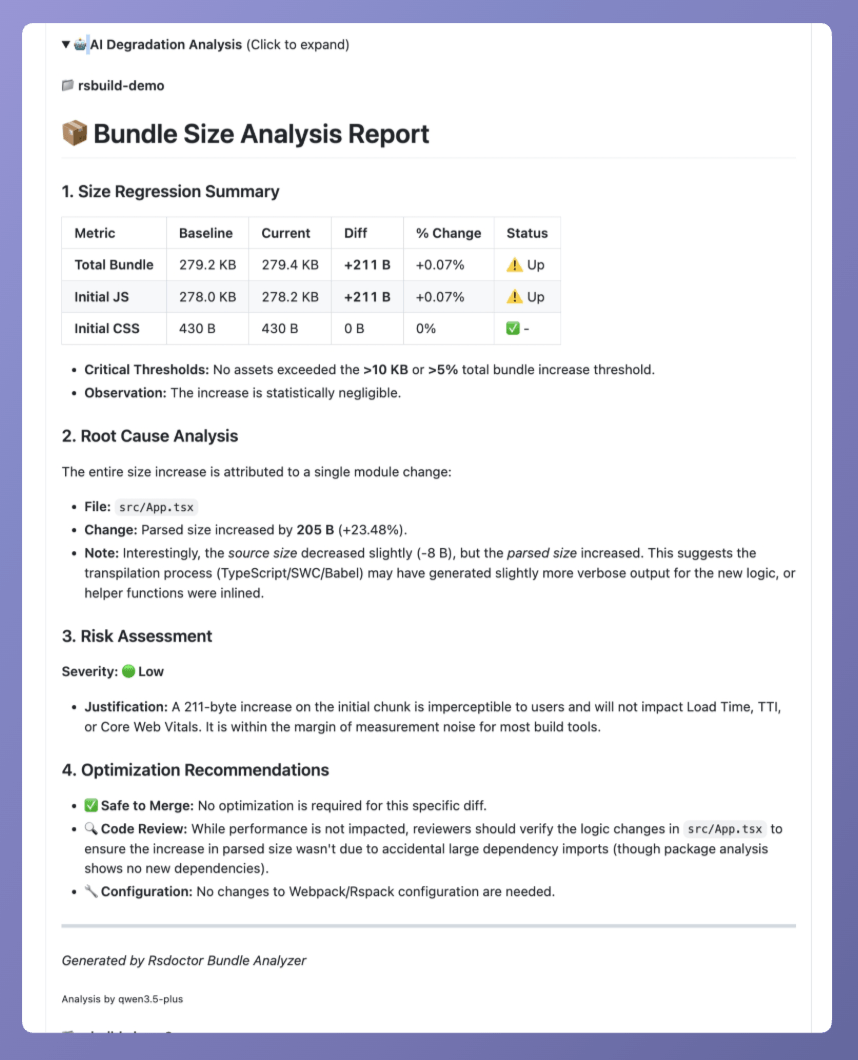
如果未提供 AI_TOKEN,Action 仍会执行常规的 bundle diff 分析,但会跳过 AI 辅助分析。AI_TOKEN 需要与 ai_model 自动识别出的 provider 匹配。例如,claude-* 使用 Anthropic token,gemini-* 使用 Google token,deepseek-* 使用 DeepSeek token,qwen* 使用 Qwen token,gpt-4o-mini 等 OpenAI 模型使用 OpenAI token。
查看报告
将上述配置文件提交到你的仓库后,GitHub Actions 将在指定的触发条件下自动运行,生成 Rsdoctor 的分析报告。你将在 GitHub CI 中看到 Bundle 大小变化的对比提示,如下图:
同时,点击 「Download Bundle Diff Report」可以下载 Rsdoctor 的 diff 报告,详细查看 diff 数据。
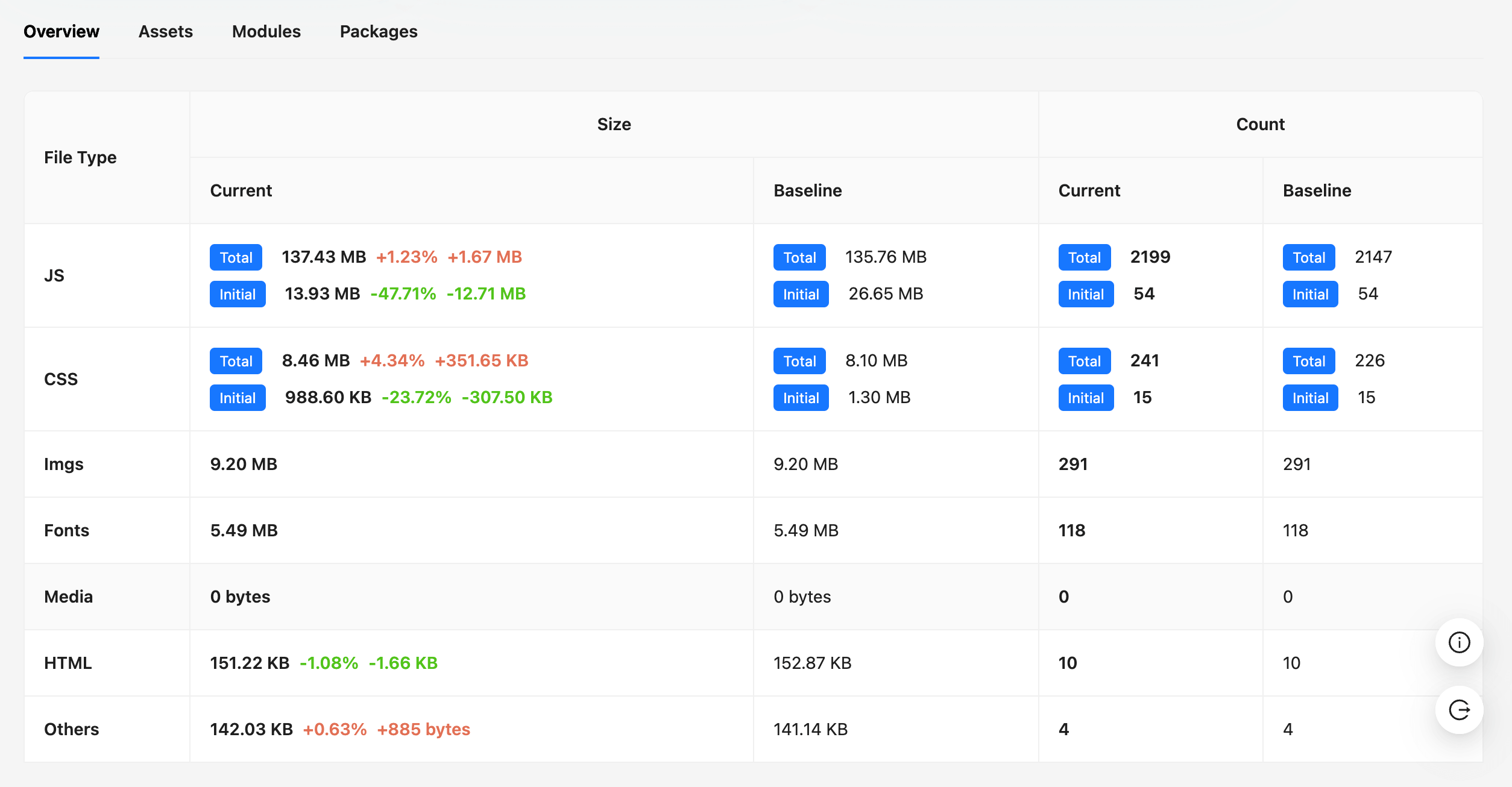
Bundle Diff 报告详细内容可查看 Bundle Diff 使用指南。
故障排除
常见问题
Q: Action 失败,提示 "❌ Rsdoctor data file not found"
- 确保构建过程生成 Rsdoctor JSON 数据,默认是
/rsdoctor-data.json。 - 检查 file_path 是否指向正确位置
- 验证 Rsdoctor 插件在您的构建工具中正确配置
Q: 如果提示 "No baseline data found",是什么原因?
- 这对于首次运行或新仓库是正常的,因为还没有上传 Baseline。因为基线数据将在首次合并到主分支后创建。
Q: 没有展示 AI 辅助分析
- 确保已经在仓库设置中创建
AI_TOKENSecret,并通过 action step 的env传入。 - 检查当前
ai_model是否与传入的 provider token 匹配。Action 会根据模型名称前缀识别 provider。 - 确认当前 workflow 已存在 baseline 数据,并且本次产物体积发生了变化。
- 对于来自 fork 仓库的 Pull Request,GitHub 出于安全原因可能不会向 workflow 暴露仓库 Secrets。