

GitHub Action Integration
Rsdoctor provides an official GitHub rsdoctor-action for easy integration of Rsdoctor analysis functionality in CI/CD workflows. Through GitHub Action, you can automatically perform bundle diff analysis on the build output and monitor and prevent bundle degradation, continuously optimizing project performance.

Quick Start
Step 1: Install Rsdoctor Plugin in Your Project
1. Follow the Quick Start guide to install the Rsdoctor plugin in your project and configure it according to your project type.
2. You need to use Brief mode and add 'json' to the type array so that the analysis data can be uploaded in the subsequent GitHub Action. For detailed configuration, see output options.
- Example below, Rsbuild integration example:
Step 2: Configure GitHub Workflow
Create a .github/workflows/ci.yml file in your GitHub repository as shown in the example below. Please note the following points:
file_path: Required, path to the Rsdoctor JSON data file.target_branch: Optional, target branch name, defaults to 'main'. If you want to use a dynamic target branch, i.e., automatically get the target branch of the current pull request instead of a fixed main branch, you can use the following configuration:
-
dispatch_target_branch: Optional, used to specify the target branch when manually triggered (workflow_dispatch). -
AI_TOKEN: Optional, used to enable AI-assisted bundle degradation analysis. Configure it as a GitHub Actions secret and pass it to the action step throughenv. -
ai_model: Optional, AI model used for degradation analysis. The default isclaude-3-5-haiku-latest. The provider is automatically detected from the model name prefix. Supported prefixes includeclaude,gemini,deepseek, andqwen; other model names use the OpenAI provider. -
onindicates when the workflow runs, commonly set topull_requestandpush, and also supportsworkflow_dispatchfor manual triggering.- On
pull_request, Rsdoctor Action fetches baseline and current and performs bundle diff analysis. - On
push(i.e., after PR merge), it updates and uploads the baseline. workflow_dispatchallows you to manually trigger the workflow from the GitHub Actions page. This mode combines the behavior ofpushandpull_request: it uploads baseline data, and ifdispatch_target_branchis specified, it also performs baseline comparison analysis.
- On
-
Before executing rsdoctor-action, build your project with the Rsdoctor plugin enabled to generate the Rsdoctor JSON data file.
AI-assisted analysis
Rsdoctor Action can use AI to summarize bundle degradation in pull requests and workflow summaries. AI-assisted analysis runs only when baseline data exists and the bundle size changes. To enable it, add an AI provider token as a repository secret and pass it to the action step:
- Open your GitHub repository, then go to
Settings->Secrets and variables->Actions. - Create a repository secret named
AI_TOKEN. - Pass the secret to
rsdoctor-actionwithenv.AI_TOKEN. - Optionally set
ai_modelif you want to use a model other than the defaultclaude-3-5-haiku-latest.
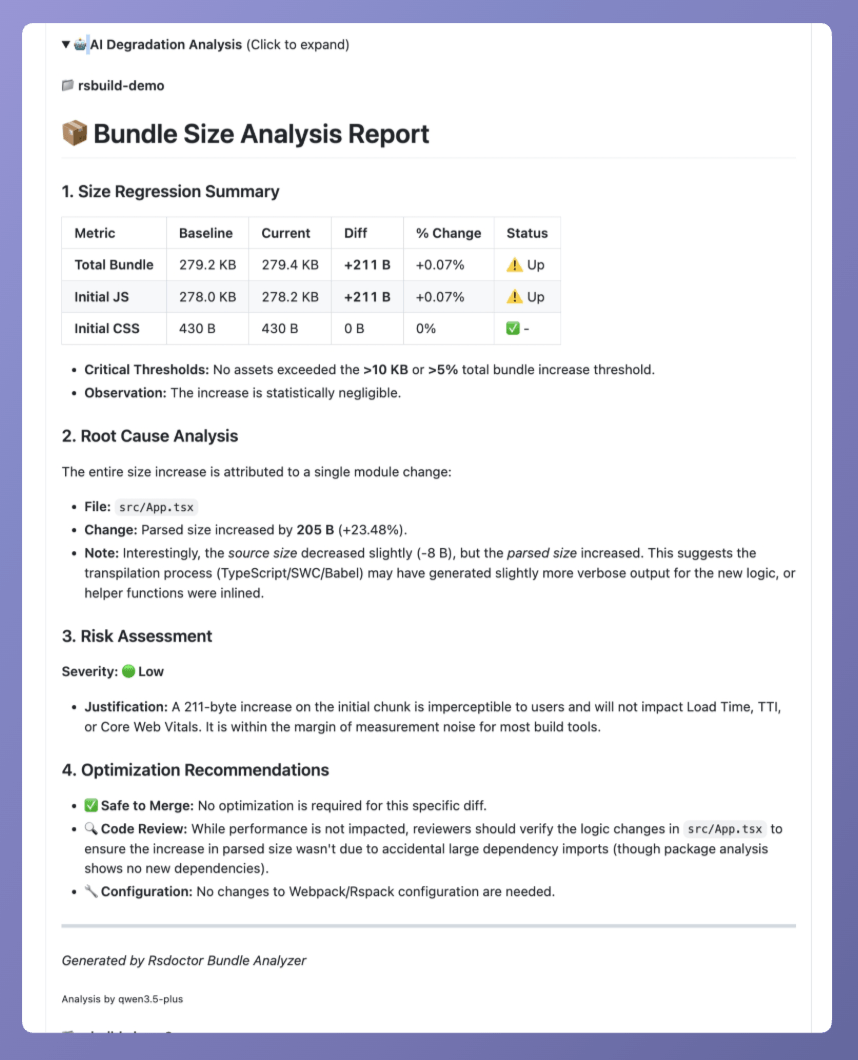
If AI_TOKEN is not provided, the Action still runs the regular bundle diff analysis, but AI-assisted analysis will be skipped. The token must match the provider detected from ai_model. For example, use an Anthropic token with claude-*, a Google token with gemini-*, a DeepSeek token with deepseek-*, a Qwen token with qwen*, or an OpenAI token with OpenAI model names such as gpt-4o-mini.
View Reports
After submitting the above configuration file to your repository, GitHub Actions will automatically run under the specified trigger conditions and generate Rsdoctor analysis reports. You will see bundle size change comparison prompts in GitHub CI, as shown below:
Additionally, clicking "Download Bundle Diff Report" allows you to download Rsdoctor's diff report for detailed diff data viewing.
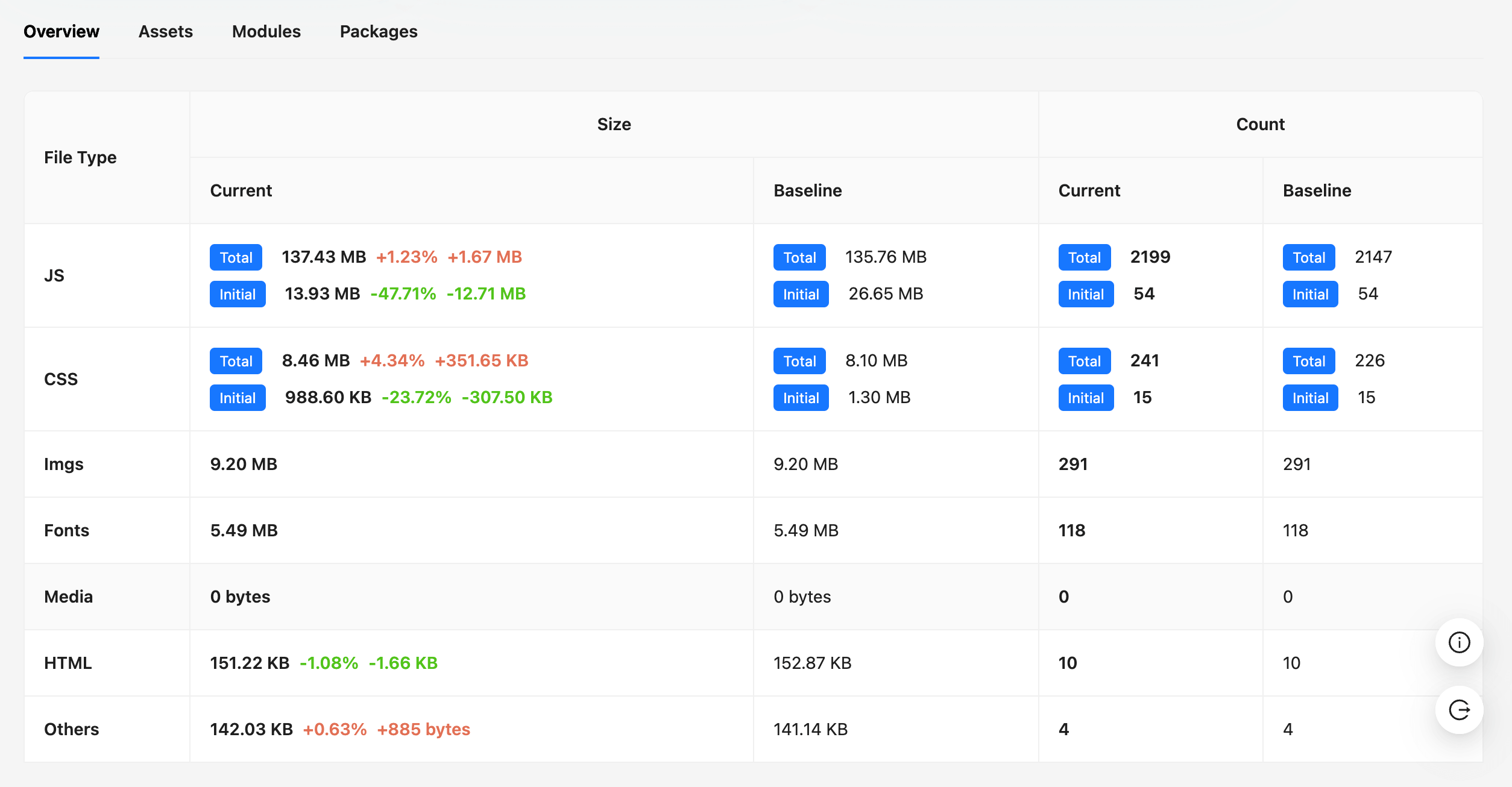
For detailed Bundle Diff report content, see Bundle Diff Usage Guide.
Troubleshooting
Common Issues
Q: Action fails with "❌ Rsdoctor data file not found"
- Ensure your build process generates Rsdoctor JSON data, the default path is
/rsdoctor-data.json. - Check if file_path points to the correct location
- Verify that the Rsdoctor plugin is properly configured in your build tool
Q: If you see the message "No baseline data found", what does it mean?
- This is normal for the first run or for new repositories, because no baseline has been uploaded yet. The baseline data will be created after the first merge into the main branch.
Q: AI-assisted analysis is not shown
- Ensure the
AI_TOKENsecret has been created in repository settings and passed to the action step throughenv. - Check whether the selected
ai_modelmatches the provider token. The provider is detected from the model name prefix. - Confirm that baseline data exists and the bundle size changed in the current run.
- For pull requests from forks, GitHub may not expose repository secrets to the workflow for security reasons.