

Custom extension rules
Introduction
Considering that users may have their own specific rule definition requirements, Rsdoctor provides an external interface for users to customize their own rule checks in addition to the built-in rules.
The external extension interface needs to be configured on the Rsdoctor plugin through the extends field, and its configuration is also placed in the rules field. See the example below:
You can follow the detailed steps below to define and write custom rules.
Steps for custom rules
1. Installation
When writing custom rules, in addition to installing the basic @rsdoctor/rspack-plugin (@rsdoctor/webpack-plugin) dependencies, you also need to install @rsdoctor/core and use the defineRule function from @rsdoctor/core/rules to define unified Rsdoctor rules.
2. Writing rules
To write rules, you need to use the defineRule function, which takes a function as input and returns an object in a fixed format. Refer to the following example:
The meta field contains the fixed configuration and content of this rule, and the check field contains the callback that includes the specific logic for rule checking. Their types are as follows.
meta object
For the definition of the meta type, please refer to RuleMeta.
Property meanings
- meta
- category
- info: Defines the category of the rule: compilation rule or build packaging rule.
- type: 'compile' | 'bundle'.
- title
- info: The title of the rule, used to display in the Rsdoctor report page.
- type: string | generics, can be passed down through generics.
- severity
- info: The severity level of the rule.
- type: Refer to the ErrorLevel type below.
- default: 'Warn'
- defaultConfig
- info: The default configuration of the rule. Custom rules may require specific configurations, and defaultConfig can be used to configure the default rule configuration.
- type: Generics, can be defined through generics. As shown in the example above.
- referenceUrl
- info: The documentation link for the rule.
- type: string.
- category
check function
The check function is mainly used for rule judgment. The parameter ruleContext is all the build information that Rsdoctor integrates during the build analysis process, and its type is defined as follows.
You can use the build information in the body of the check function to make custom rule judgments. After the judgment, if the rule check fails, you can report it using the report method in the parameter. See the next step for details.
CheckCallback type
RuleCheckerContext type definition, please refer to the details
Example
The following example is a custom rule that limits the number of assets:
3. Reporting rule results
To report errors, you need to use the report method in the check callback function's parameter. The report method's parameters mainly include the following parts:
- message: The error message.
- document: File data used to describe the location of the error code and code position.
- suggestions: Rule suggestions.
- detail: Detailed information, mainly providing additional data to the frontend.
For detailed type definitions, refer to: ReportData
4. Displaying rule results
The report function will pass the error information of custom rules to the compilation's errors or warnings. It will display the rule results in the terminal during the build process, and even interrupt the build.
At the same time, Rsdoctor also has two components that can be used to display rules. For more details, see Display Components.
- Basic Rule Warning Component

Display components
Basic rule warning component
-
Component Type
-
Component Input
-
type
- The type of the component.
- value: 'link'.
-
title
- The title of the rule.
- type: string.
-
description
- The description of the rule. The data comes from the
messageordetail.descriptionin thereportfunction: - type: string.
- The description of the rule. The data comes from the
-
level
- The level of the rule.
- type: warn | error.
-
link:
- The details of the rule. The data comes from
detail.link: - type:string。
- The details of the rule. The data comes from
-
-
Example
- Display Components
- Component Code Code
Code display component
-
Component Type
-
Component Input
-
type
- The type of the component.
- value: 'code-view'.
-
title
- The title of the rule.
- type: string.
-
description
- The description of the rule. The data comes from the
messageordetail.descriptionin thereportfunction: - type: string.
- The description of the rule. The data comes from the
-
level
- The level of the rule.
- type: warn | error.
-
file
- Code details for display.
- type:
- file: string, code file path.
- content: string, code content.
- ranges: SourceRange, code line and column ranges.
-
-
Example
-
Component Display
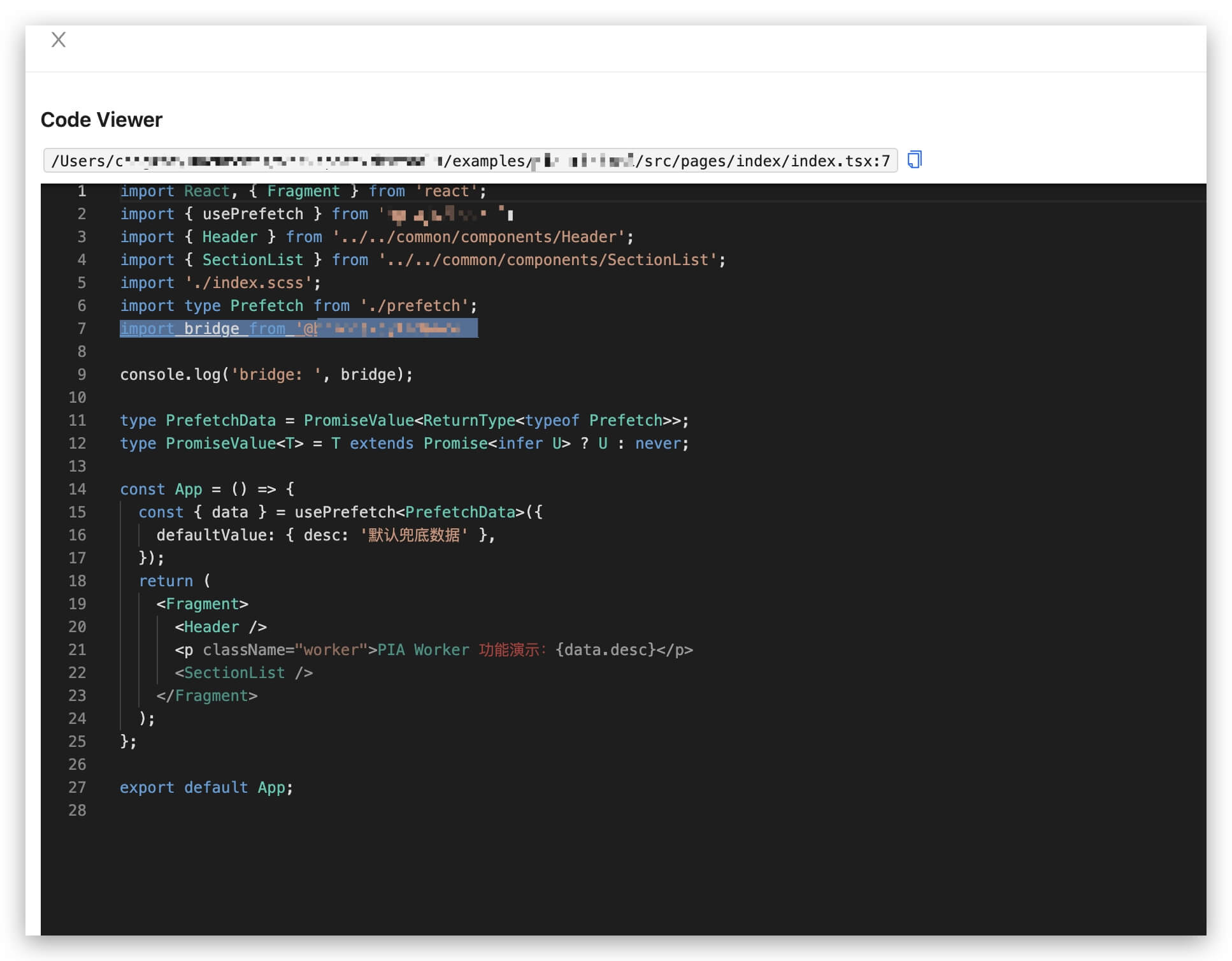
- Component Code: Code
Type definitions
RuleMeta
RuleCheckerContext
ReportData
LinkRuleStoreData
CodeViewRule
Tools
AST processing
When performing rule detection and analysis, it is common to perform AST analysis on modules and other operations. To provide more auxiliary functions, we also provide @rsdoctor/utils/rule-utils in the @rsdoctor/utils package, which contains many useful utility functions and methods.
The asserts assertion method set provides type assertion methods for all AST nodes, while the utils utility method set provides commonly used methods such as determining whether certain statements have the same semantics and retrieving Import nodes.
Reporting code position
Some errors require providing the position of the code, so the content of the document field needs to be provided. However, there is an important distinction here: each module actually has two sets of code, transformed and source, which means the code after being processed by the loader and the user's original code. The AST is actually the transformed code format.
To facilitate display for users, we need to use the original code as much as possible. Therefore, after selecting the corresponding AST node, users need to use the SourceMap module provided by the module to convert the position information to the original code. If the module does not have the original code or SourceMap for some special reasons, then using the transformed code/position is more appropriate. A typical workflow is as follows:
Data reporting
Please go to Data Reporting for viewing.